Reputation Management: Automatically Request Google and Facebook Reviews
LeadLeaf reputation management automatically requests reviews after every job, pulls in reviews from Google, Facebook, Yelp, Trustpilot, and the BBB, and lets you respond from one inbox. Included on every plan starting at $99 per month.
 Automated review requestsReviews from Google, Facebook, Yelp, Trustpilot, BBBRespond from one inboxTied to the CRM contact record
How does reputation management in LeadLeaf work?
After a job is marked complete, LeadLeaf sends an automated review request by text and email. The request links straight to your Google and Facebook review pages, so happy customers leave a review in two taps. The request is tied to the contact record, so you can see who was asked and who responded.
After a jobRequest links straightRequest is tiedRequest sent to customer
Thanks for choosing us. Would you take a moment to leave a review?
Great service, on time and professional.
Posted to your public profile
Which platforms can reviews be pulled from?
LeadLeaf pulls in reviews from Google, Facebook, Yelp, Trustpilot, and the Better Business Bureau. You see every review in one inbox, regardless of which platform it came from, so you do not need to check each site separately.
Pulls in reviewsSee every reviewUnlimited usersMonitor and respond
Monitor and respond
Yelp
Monitor and respond
Trustpilot
Monitor and respond
BBB
Monitor and respond
Direct review requests to
Can I respond to reviews from one place?
Yes. You can reply to Google and Facebook reviews directly from the LeadLeaf inbox. The response posts back to the platform, and the conversation is logged on the contact record.
Reply to GoogleResponse posts backDrag and drop builderWaited longer than expected for a callback.
Public reply
Sorry about the wait. We would like to make this right.
Friendly team, fixed the issue same day.
Can I automate review requests?
Yes. Workflow automation sends the request after a job is complete. You set the trigger, such as moving a deal to the Won stage, and the request goes out on its own. You can also send requests manually for one off situations.
Workflow automation sendsSet the triggerSend requests manuallyTrigger
Appointment marked complete
Wait
2 hours
Action
Send review request
Does reputation connect to the CRM?
Every review and review request is tied to the contact record. You can see a customer's review history, their rating, and whether they responded to your request, all in one place.
Every review andSee a customersAutomated sequencesAverage rating
Across Google, Facebook, Yelp, Trustpilot and BBB
Which plan includes reputation & review management?
See which LeadLeaf plan reputation & review management is included on.
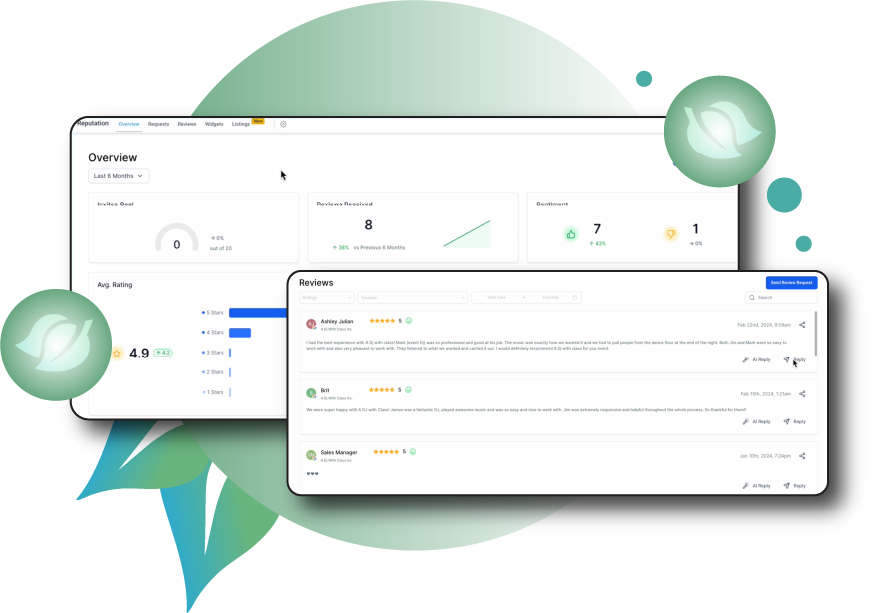
Reputation & Review Management in action
A live view of the reputation & review management interface inside LeadLeaf.
Related features
These features work alongside reputation & review management in the same platform.
CRM & Pipeline Management
LeadLeaf CRM and pipelines give you a single system to track every contact, manage unlimited sales pipelines, and move leads from first inquiry to closed deal.
Learn more2-Way SMS Marketing
LeadLeaf 2-way SMS marketing lets you text leads from a single inbox, send bulk campaigns, and automate missed call text back replies.
Learn moreSocial Media Management
LeadLeaf social media management lets you plan, schedule, and publish posts across 10 platforms from one planner, with every engagement tied to the CRM.
Learn moreReputation & Review Management FAQ
Start your 14 day free trial today
14 day free trial with unlimited users. Plans start at $99 per month.