Social Media Management: Schedule Across 10 Platforms From One Planner
LeadLeaf social media management lets you plan, schedule, and publish posts across 10 platforms from one planner, with every engagement tied to the CRM. Included on the Professional plan at $299 per month.
 Schedule across 0 platformsDrag and drop content calendarEngagement tied to the CRMReusable post templates
How does social media management in LeadLeaf work?
The content composer lets you write a post once and publish it to Google Business Profile, Facebook, Instagram, Threads, LinkedIn, TikTok, Pinterest, YouTube, X, and Reddit. A drag and drop calendar shows what is scheduled and what is published, so you can plan a month of content in one sitting.
Content composer letsDrag and dropUnlimited usersPost text
Spring AC tune up special this week. Book online and save.
Publish to
Schedule
Wed 9:00 AM
Which platforms are supported?
LeadLeaf connects to Google Business Profile, Facebook, Instagram, Threads, LinkedIn, TikTok, Pinterest, YouTube, X, and Reddit. Ten platforms from one planner, so you do not need a separate tool for each network.
Connects to GoogleTen platforms fromDrag and drop builderConnect and publish across all your social channels from one unified platform
GBP (Google)
Active integration
Active integration
Active integration
Threads
Active integration
Active integration
TikTok
Active integration
Active integration
YouTube
Active integration
Community
Active integration
Bluesky
Active integration
Can I schedule posts in advance?
Yes. You pick a date and time for each post, and the planner publishes it automatically. You can schedule a week or a month of content at once and let the planner handle the publishing.
Pick a dateSchedule a weekAutomated sequencesMon
Tue
Wed
Thu
Fri
Does social engagement connect to the CRM?
Messages and comments from connected platforms flow into the universal inbox alongside SMS, email, and webchat. A direct message on Instagram becomes a conversation in the same inbox you already use, and the contact record stays up to date.
Messages and commentsDirect message onContact timelinesJordan A.
InstagramDo you service my area?
Sam K.
FacebookThanks for the quick reply!
Riley M.
LinkedInSent you a DM about a quote.
Can I reuse post templates?
Yes. You can save a post as a template and reuse it for recurring content like weekly promotions or monthly tips. This keeps your branding consistent and speeds up content creation.
Save a postKeeps your brandingPipeline stagesWeekly Maintenance Tip
Educational • Used 12 times
Seasonal Promotion Offer
Sales • Used 8 times
5-Star Customer Review
Social Proof • Used 15 times
Which plan includes social media management?
See which LeadLeaf plan social media management is included on.
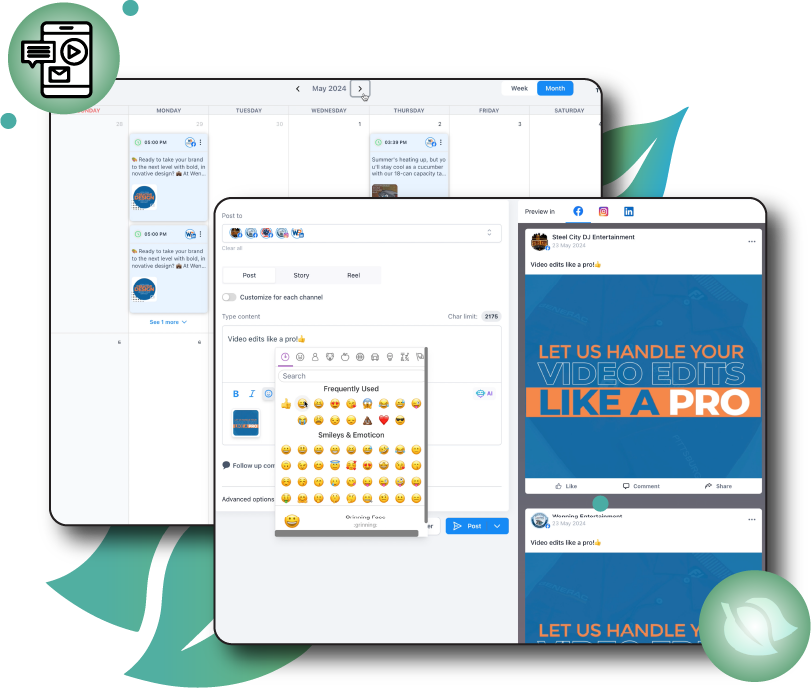
Social Media Management in action
A live view of the social media management interface inside LeadLeaf.
Related features
These features work alongside social media management in the same platform.
Email Marketing Campaigns
LeadLeaf email marketing lets you send newsletters and automated drip campaigns from a drag and drop builder, with every email tied to the same CRM contact record.
Learn moreReputation & Review Management
LeadLeaf reputation management automatically requests reviews after every job, pulls in reviews from Google, Facebook, Yelp, Trustpilot, and the BBB, and lets you respond from one inbox.
Learn moreWorkflow Automation
LeadLeaf workflow automation lets you connect triggers to multi-step actions across SMS, email, pipelines, and calendars, so follow up runs without manual work.
Learn moreSocial Media Management FAQ
Start your 14 day free trial today
14 day free trial with unlimited users. Plans start at $99 per month.